
As an Amazon Associate, I earn from qualifying purchases
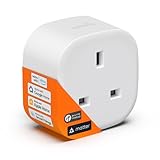
Imagine walking into your home after a long day and the lights automatically turn on, your favorite music begins to play, and your coffee maker starts brewing — all without you lifting a finger. This isn’t science fiction anymore; it’s the everyday convenience that a smart plug can bring into your life.
Smart plugs are among the most affordable and beginner-friendly smart home devices, yet they can completely transform the way you interact with your appliances. From energy monitoring to remote control, scheduling, and voice commands, these tiny devices make any ordinary outlet smart.
But with so many models on the market, choosing the right smart plug can feel confusing. Some are Wi-Fi-enabled, while others require hubs. Some prioritize energy efficiency, while others focus on advanced automation features.
This comprehensive buying guide will walk you through everything you need to know before purchasing — from understanding key features and setup considerations to exploring pros, cons, and expert tips — so you can confidently choose the smart plug that fits your lifestyle.
What to Consider Before Buying a Smart Plug
Before you click that “Add to Cart” button, take a few moments to consider what matters most for your specific home setup and needs. Smart plugs may seem simple, but their functionality varies greatly depending on design, compatibility, and features.
1. Connectivity: Wi-Fi vs. Hub-Based
Wi-Fi Smart Plugs:
- Connect directly to your home Wi-Fi network.
- No hub or bridge required.
- Ideal for beginners who want quick setup and app-based control.
Hub-Based Smart Plugs:
- Require a separate hub or gateway (often for Zigbee or Z-Wave systems).
- Offer greater reliability, security, and scalability for larger smart homes.
- Perfect for users who already have multiple smart devices and want unified control.
Expert Insight:
If you’re just starting with smart home automation, a Wi-Fi plug is a great entry point. However, for homes with many connected devices, hub-based plugs reduce Wi-Fi congestion and improve stability.
2. Voice Assistant Compatibility
Most modern smart plugs integrate with voice assistants, allowing you to control appliances hands-free.
Common Compatible Systems:
- Voice assistants (e.g., Alexa, Google Assistant, Siri)
- Smart home ecosystems (e.g., Apple HomeKit, SmartThings)
- Automation platforms (e.g., IFTTT for custom routines)
Example Use Cases:
- “Turn off the lamp in 10 minutes.”
- “Start the humidifier when humidity drops below 40%.”
- “Turn on the coffee maker at 7 a.m. every weekday.”
Tip:
Before buying, confirm that the plug supports your existing voice assistant. Some plugs only work with certain ecosystems.
3. App Interface and Ease of Use
A good companion app makes all the difference.
Look for an app that offers:
- Quick setup: Minimal steps to connect the plug to Wi-Fi.
- Scheduling options: Set devices to turn on/off automatically.
- Grouping: Control multiple plugs simultaneously.
- Energy monitoring: Track power consumption to save on electricity bills.
- Remote access: Manage appliances even when you’re away from home.
Real User Experience:
Many users appreciate smart plugs with intuitive mobile apps that show real-time power usage — not just for convenience, but also for helping identify which devices waste energy.
4. Energy Monitoring and Efficiency
Energy efficiency is one of the top reasons people buy smart plugs.
Energy-Monitoring Smart Plugs Offer:
- Real-time tracking of energy consumption.
- Reports on total power usage per day/week/month.
- Alerts when devices draw excess power.
- Cost estimation based on electricity rates.
This feature not only helps you save money but also reduces your carbon footprint — making it a win for both your wallet and the planet.
5. Size and Design
While function is key, form also matters — especially if you plan to use multiple plugs in one outlet.
Key Considerations:
- Compact Design: Avoids blocking adjacent outlets.
- Horizontal vs. Vertical Orientation: Fits different socket layouts.
- Indoor vs. Outdoor Models: Weatherproof options for garden lights, fountains, or patio appliances.
Pro Tip:
If you plan to automate more than one appliance, look for stackable smart plugs or smart power strips for space efficiency.
6. Safety and Certification
Safety is critical when it comes to electrical devices. Always look for:
- Overload Protection: Prevents short circuits or overheating.
- Fire-Resistant Materials: Ensures long-term durability.
- Certified Standards: UL, CE, or FCC certifications guarantee tested safety.
Parental Note:
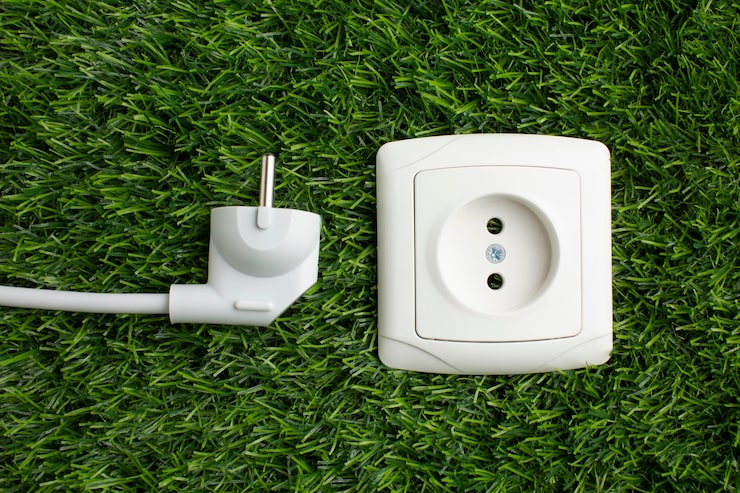
If children are around, choose models with tamper-resistant outlets or safety covers to avoid accidents.
7. Automation Features
Beyond manual control, automation gives you the real “smart” experience.
Examples of Automation:
- Turn on the heater when temperature drops below 20°C.
- Power off the TV after midnight automatically.
- Start the coffee maker when your morning alarm goes off.
Many plugs also allow “away mode” — randomly turning lights on/off to mimic occupancy, adding a layer of home security.
8. Integration with Smart Ecosystems
If you already own smart bulbs, thermostats, or cameras, consider how your new smart plug will fit into your setup.
Popular Integrations:
- Smart lights: Sync lamps to turn on when you arrive home.
- Security systems: Power on alarms or cameras automatically.
- Smart thermostats: Manage heating/cooling devices for efficiency.
Expert Opinion:
Choosing a plug that integrates smoothly with your ecosystem helps you future-proof your smart home setup, avoiding compatibility issues later.
Product Summary: Comparing Smart Plug Types
| Feature | Wi-Fi Smart Plug | Hub-Based Smart Plug | Outdoor Smart Plug |
|---|---|---|---|
| Connection Type | Direct Wi-Fi | Zigbee/Z-Wave via hub | Wi-Fi (weatherproof) |
| Ease of Setup | Easy | Moderate | Easy |
| Best Use | General home appliances | Advanced smart homes | Garden/patio lighting |
| Range | Wi-Fi limited | Extended via hub | Wi-Fi range |
| Energy Monitoring | Often included | Usually included | Sometimes included |
| Durability | Indoor use | Indoor use | Water-resistant |
| Ideal User | Beginners | Smart home enthusiasts | Outdoor users |
Pros and Cons of Using Smart Plugs
Pros
- Convenience: Control appliances remotely or on a schedule.
- Energy Savings: Monitor and reduce unnecessary power use.
- Automation: Simplifies daily routines.
- Voice Control: Hands-free operation for lights, fans, and more.
- Enhanced Safety: Prevents overheating or forgotten devices.
- Accessibility: Helpful for elderly or mobility-challenged users.
Cons
- Dependence on Wi-Fi: May not function during outages.
- App Clutter: Too many devices can complicate app management.
- Compatibility Gaps: Some models work only with specific ecosystems.
- Limited Power Capacity: Not suitable for high-wattage appliances like heaters or air conditioners (unless specified).
Tip:
Always check the maximum load capacity (typically 10A–16A) to ensure compatibility with your appliances.
Who It’s Best For
| User Type | Why It Fits |
|---|---|
| Beginners in Smart Homes | Easy entry point into automation without complex setup. |
| Busy Professionals | Automate daily tasks and manage home appliances remotely. |
| Families | Create energy-saving routines and ensure safety for kids. |
| Elderly Users | Hands-free control for lamps or heaters improves convenience. |
| Eco-Conscious Consumers | Monitor and reduce power waste for sustainability. |
| Renters | No permanent installation required — ideal for apartments. |
Expert Opinions and Real Insights
Energy Specialists:
According to energy experts, smart plugs can cut household electricity use by up to 10% annually, especially when used for high-standby appliances like TVs or microwaves.
Smart Home Enthusiasts:
Enthusiasts praise smart plugs for their simple setup and automation flexibility. Many highlight their usefulness in transforming “dumb” devices — like coffee makers or lamps — into connected, programmable tools.
Personal Experience Example:
A homeowner who travels frequently reported using smart plugs to simulate occupancy while away, improving home security and peace of mind. Another user mentioned saving on bills by scheduling the water heater and iron to power off automatically.
Research Insight:
Studies show that even small automations — like turning off idle chargers or standby electronics — can collectively reduce annual energy costs significantly.
Tips for Using Smart Plugs Efficiently
- Group Devices: Combine lamps or fans in the same room for one-tap control.
- Use Routines: Automate morning or bedtime rituals.
- Track Energy Usage: Identify energy-hogging devices and replace or limit their use.
- Set Vacation Mode: Use random on/off schedules to deter burglars.
- Update Firmware: Regular updates improve performance and security.
- Label Each Plug: Helps identify devices easily in the app.
Example Routine:
At 10 p.m., turn off all lights, lock doors (via other smart devices), and activate the bedroom fan — all triggered by one voice command.
Maintenance and Longevity Tips
- Avoid Overloading: Use only within the rated wattage.
- Keep Dry: Avoid moisture exposure (unless outdoor-rated).
- Clean Regularly: Dust and dirt can interfere with connectivity.
- Unplug When Not in Use: Extends the life of both plug and appliance.
- Firmware Updates: Ensure optimal compatibility and security.
Proper care not only prolongs device lifespan but also keeps your home automation system stable.
Common Use Cases
- Lighting Automation: Schedule lamps to turn on at sunset.
- Energy Management: Track and control high-consumption devices.
- Appliance Safety: Turn off irons or heaters automatically.
- Pet Care: Schedule feeding machines or heating pads.
- Seasonal Use: Automate holiday lights or decorations.
- Security Simulation: Randomly activate lights while you’re away.
Frequently Asked Questions (FAQ)
1. Do I need a hub to use a smart plug?
Not always. Many smart plugs work directly with Wi-Fi, though hub-based ones may offer more reliability and compatibility.
2. Can smart plugs save energy?
Yes, especially those with monitoring features. They help track and reduce unnecessary standby power usage.
3. Are smart plugs safe for all appliances?
Most are suitable for lamps, fans, or small electronics. Avoid using them with heavy-duty appliances unless rated for higher wattage.
4. Can I use a smart plug outdoors?
Only if it’s specifically designed for outdoor use and weatherproof.
5. What happens during Wi-Fi outages?
Most smart plugs stop remote control functions but retain pre-set schedules.
6. How many smart plugs can I use at once?
Depends on your Wi-Fi strength and router capability — typically up to 10–20 without issues.
7. Can multiple users control the same plug?
Yes, many apps allow multi-user access with shared permissions.
Final Recommendation
When buying a smart plug, focus on features that match your home’s needs rather than just price.
- For Beginners: Choose a Wi-Fi plug with a simple app interface and basic scheduling.
- For Smart Home Owners: Consider a hub-based plug for smoother integration and reliability.
- For Outdoor Use: Look for waterproof smart plugs with protective housing.
- For Energy Savers: Pick one with built-in energy monitoring to track consumption.
A smart plug might be small, but its impact is huge. It bridges the gap between traditional and connected living — giving you control, convenience, and peace of mind all in one.
Conclusion
A smart plug is one of the most practical investments for anyone stepping into the world of home automation. It’s affordable, easy to use, and instantly adds intelligence to your existing appliances.
Whether you’re looking to cut energy costs, simplify routines, or just enjoy the comfort of saying “turn off the lights” without getting up, a well-chosen smart plug can make your home feel effortlessly modern.
By understanding the key factors — from connectivity and compatibility to safety and automation — you can make a confident, informed choice.
Latest Post
- Right Choices: Everyday Buying Guide
 PHI VILLA Garden Chairs Set of 2, Patio Chairs Stackable Outdoor Dining Chairs High Back, Textilene Fabric and E-Coating Metal Frame for Backyard Porch Poolside PHI VILLA Garden Table for 4, Square Metal Outdoor Dining Table with Carbon Crystal Tabletop and Marble Texture, E-Coating Patio Table for Backyard Porch Poolside, 94 x 94 x 74cm… Read more: Right Choices: Everyday Buying Guide
 - Best Buys: Everyday Essentials Guide
 OBEST Action Camera, 1080p Mini Thumb Action Camera,360° Body Camera Magnetic Pocket Body Cam, 128GB Card, Ip68 Waterproof, Mini Body Camera for Motorcycle, Bike, Work, Travel Mini Projector HD 1080P 4K Supported Smart Projectors Auto Keystone & Focus 22000 Lumen 260 ANSI Bightness WIFI 6 and Bluetooth Home Theatre 200″ w 270°Rotatable Stand for Game/Bedroom/Outdoor/Phone… Read more: Best Buys: Everyday Essentials Guide
 - Tap Smart: Ultimate Tablet Buying Guide
 DOOGEE Tab E3 Max 14 Inch Tablet Android 15 Gaming Tablet 13500mAh Large Battery MTK G100 Octa-Core 32GB RAM+256GB ROM (2TB TF), 2.1K (2160 * 1440) Display 16MP+2MP+8MP 4G LTE/5G WLAN/GPS/GMS – Blue DOOGEE U10 Android 16 Tablets, 10 Inch HD+ IPS Tablet, 16GB RAM+128GB ROM+2TB AI Tablet, 5060mAh Android Tablets, 8MP+5MP Cameras, Gemini AI/Widevine… Read more: Tap Smart: Ultimate Tablet Buying Guide
 - Find Your Perfect Smartphone
 DOOGEE Blade 10 Power Rugged Smartphone, Android 16 Rugged Phone With 10300mAh&18W Flash Charging, 24GB+256GB/2TB, Octa Core, 50MP Camera, 6.6″ HD+ 90Hz, 3 Cards Slots, Fingerprint, Face ID, NFC, GPS DOOGEE Blade10 Max Rugged Smartphone, 10300mAh Battery, 1.54” Touch Back Screen, 20GB RAM 256GB ROM, 6.56″ 90Hz FHD+ Display, IP69K Waterproof, 4G Dual SIM, 3… Read more: Find Your Perfect Smartphone
 - Smart Picks: Daily Use Buying Guide
 Trsaow Electric Fence Energiser 12V 2J, 10 km Range,IP44 Electric fence posts, Electric Fence Tester Insulators, Weatherproof Kit for Horses, Cattle, Pigs, Goats, 2J Output, 3 Ways to Power Hair Dryer High Speed for Women,2000W Professional Blow Dryer, Fast Drying Negative Ion Hairdryer Blowdrye, 3 Heat Settings & Speed, 1 Diffuser & 1 Nozzle for… Read more: Smart Picks: Daily Use Buying Guide
 - Easy Guide to the Best Tablets
 DOOGEE Tab A9 Pro Android 16 Tablet with Keyboard, Gemini AI 20GB RAM+128GB(2TB) ROM Unisoc T310 10 inch Tablets 6580mAh Battery AI Camera|5G WiFi|Bluetooth|Face ID|3.5mm Gaming Tablet with Pen Black DOOGEE T10W Android 15 Tablets 2025, 10 inch Tablet with SIM Card Slots, 16GB RAM+128GB ROM/2TB, Android Tablets, 8000mAh, Tablet with Keyboard/Pen/Mouse/Case, 4G LTE/Widevine L1/Face… Read more: Easy Guide to the Best Tablets
 - Sleep Better: Mattress Buying Guide
 Inofia Double Mattresses 4FT6,30CM Memory foam Pocket Sprung Hybrid Mattress,Orthopaedic Pressure Relief & Motion Isolation,Medium Firm,Mattress in a Box Resspry Small Double Size Mattress,12 Inch Memory Foam Sprung Mattress 4FT for Pressure Relief and Cool Sleep, Supportive Medium Firm Hybrid Mattress,The Nocturne Collection(120×190×30cm) I may earn a small commission when you shop through my links,… Read more: Sleep Better: Mattress Buying Guide
 - Find Your Perfect Tablet Today
 POCKAM P10 Kid Kids Tablet, 32GB RAM + 64GB ROM, 90Hz Android 16 Tablet with Gemini AI, Quad-Core T310, 10.1” IPS HD Screen, 7000mAh, 5G WIFI, 10 inch Talet with Stylus Pen, Silicone Case-Blue DOOGEE TAB G6 PRO Android 16 Tablet 12 Inch Android Tablets, 2.4K 90Hz, 36GB+128GB/2TB Tablet with Sim Card Slot, 9000mAh,Helio G100… Read more: Find Your Perfect Tablet Today
 - Tablet Picks: Smart Buying GuideDOOGEE TAB A9+ 2025 Newest 11 Inch Android 15 Tablet, 8580mAh Tablet With Keyboard, T7200 Octa Core Android Tablets, 20GB + 64GB/2TB Tablets With Pen, 13+5MP, 2 Speakers + Widevine L1, Mouse & Case DOOGEE TAB A9+ 2025 Newest 11 Inch Android 15 Tablet, 8580mAh Tablet With Keyboard, T7200 Octa Core Android Tablets, 20GB +… Read more: Tablet Picks: Smart Buying Guide
- Tap Smart: Ultimate Tablet Buying Guide
 Introduction Tablets have become one of the most versatile digital devices in modern life. They combine the portability of a smartphone with the functionality of a laptop, making them ideal for entertainment, productivity, learning, creativity, and communication. Whether you want a device for streaming movies, attending online classes, reading digital books, sketching artwork, or handling… Read more: Tap Smart: Ultimate Tablet Buying Guide
 - Tablet Buying Made Easy
 Aorlym P10 Android 16 Tablet, 10 Inch Tablet, 48GB RAM+128GB ROM/2TB TF, Gemini AI, 90Hz Display, 7000mAh, 5W OTG, 5G WiFi, Face ID, OTG, GPS, 3.5mm Jack, Widevine L1, Tablet with keyboard DOOGEE TAB A9+ 2025 Newest Android 16 Tablet with Gemini AI, 11 Inch 8580mAh Tablet With Keyboard, T7200 Octa Core Android Tablets, 20GB+64GB… Read more: Tablet Buying Made Easy
 - Smart Choices: Everyday Essentials Buying Guide –AMZCHEF Coffee Machine 20 Bar, 1350W Espresso Machine, Compact Stainless Steel Coffee Machines with LED Touch Screen, Powerful Steam Wand, Removable Water Tank AMZCHEF Burr Coffee Grinder, Coffee Grinders Electric with 45 Precise Grind Settings, Adjustable Portafilter Holder & LED Touchscreen – Anti-Static, Easy Clean AMZCHEF Cold Press Juicer Machines, 3-IN-1 Masticating Juicer with 2… Read more: Smart Choices: Everyday Essentials Buying Guide –
- Smart Choices: Everyday Essentials Buying GuideOBEST Action Camera 1080P HD, Mini Body Cam 120° Wide Angle, Sport Camera Night Vision Infrared, 0.85inch Screen 10+ Multi-function Accessories for Cycling/Vlogging/Skiing/Surfing (No SD Card) Mitclear Heavy Duty Wire Broom with Telescopic Handle(57IN), Stiff Metal Bristle Brush for Removing Weed Moss Algae, Outdoor Floor Scrub Brush for Patio, Deck, Garden Kids Metal Detector, Potuem… Read more: Smart Choices: Everyday Essentials Buying Guide
- Smart Picks: Mobile Phone Buying GuideOSCAL Mobile Phones 5G, Tiger 8 Smartphone Android 15 (2026), NFC Android Phone, 120Hz, 12GB+128GB/2TB TF Octa Core, 6.88”HD, 5000mAh Dual SIM Unlocked, 16MP Camera (10X), Fingerprint/FaceID, Black OSCAL Marine3 Slim & Portable Rugged Smartphone (2026-3YRW),32G RAM +128GB/2TB Rugged Phone, NFC, Android 16 Phone, Doke AI &OS 5, IP69K Protection,6.56″ HD,90HZ,16MP Night, Dual SIM/1TF Slots,… Read more: Smart Picks: Mobile Phone Buying Guide
- Shuffle Like a Pro: Your Ultimate Card Shuffler Buying GuideCard Shuffler Machine, 3000mAh Automatic Card Shuffler with USB Charging Cable, Two-deck Card Shuffling Machine, Low Noise Card Shufflers suitable for UNO, Poker, Texas Hold’em and blackjack As an Amazon Associate, I earn from qualifying purchases Whether you’re a casual card player or host weekly poker nights, shuffling can quickly become tedious—especially when playing multiple… Read more: Shuffle Like a Pro: Your Ultimate Card Shuffler Buying Guide