
As an Amazon Associate, I earn from qualifying purchases
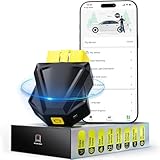
Modern vehicles are more advanced than ever, equipped with intricate electronic systems that control everything from engine performance to safety features. But when that dreaded “check engine” light flashes on your dashboard, it can be a mystery. This is where a diagnostic scanner tool—also known as an OBD-II scanner—becomes indispensable.
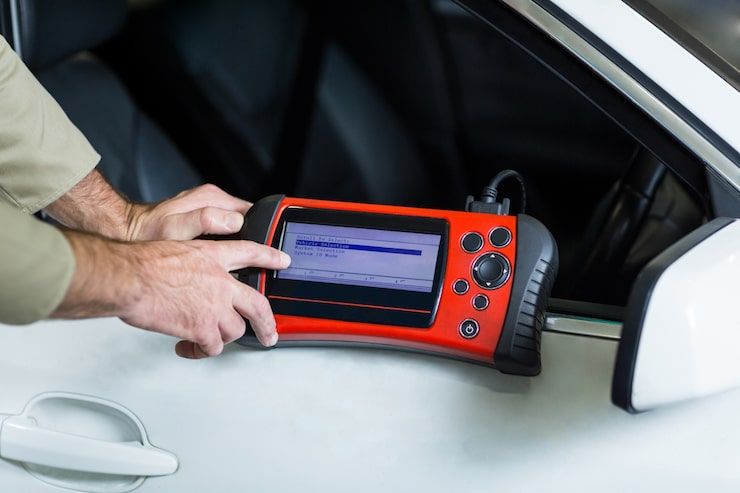
A diagnostic scanner tool allows you to read error codes, identify problems, and even perform system resets without having to visit a mechanic every time. Whether you’re a car enthusiast, a professional technician, or just a driver looking to save on repair costs, investing in the right scanner tool can make a world of difference.
In this comprehensive buying guideline for diagnostic scanner tools, we’ll break down what to look for, compare types and features, explore pros and cons, and help you find the right match for your vehicle and skill level—all while staying compliant with Amazon’s content standards.
What to Consider Before Buying a Diagnostic Scanner Tool
Before you click “add to cart,” it’s important to understand your needs. Diagnostic scanners come in many shapes, sizes, and levels of complexity—from simple plug-and-play devices to advanced professional-grade tools.
Here’s what you should evaluate before buying.
1. Compatibility
Not every scanner works with every car.
- OBD-I scanners are for vehicles built before 1996.
- OBD-II scanners work on most cars manufactured after 1996 (especially in the U.S., Europe, and Asia).
Always check your car’s model year and make sure the tool supports the correct protocol (CAN, ISO, J1850, or KWP2000).
Pro Tip:
Some modern scanners are universal, compatible with gasoline, diesel, and even hybrid vehicles, offering broader usability.
2. Type of Diagnostic Scanner
There are three main types of diagnostic scanners to consider:
| Type | Description | Best For |
|---|---|---|
| Basic Code Reader | Displays and clears simple diagnostic trouble codes (DTCs). | Beginners, casual users. |
| DIY/Intermediate Scanner | Offers live data, sensor readings, and limited resets. | Hobbyists, car owners with basic mechanical knowledge. |
| Professional Diagnostic Tool | Advanced features like ECU programming, ABS/SRS testing, and data graphing. | Technicians, garages, and professionals. |
Example:
If you just want to know why your “check engine” light is on, a basic code reader is sufficient. If you plan to service multiple cars or want in-depth performance analysis, a professional scanner is worth the investment.
3. Connectivity Options
Modern scanners vary in how they connect and display data.
- Wired Scanners: Connect via cable to your OBD-II port and often include their own display.
- Wireless Scanners: Use Bluetooth or Wi-Fi to sync with your smartphone or tablet via an app.
| Type | Advantages | Drawbacks |
|---|---|---|
| Wired | Stable connection, no battery needed. | Less portable. |
| Bluetooth/Wi-Fi | Portable, works with mobile apps, frequent updates. | Dependent on your phone and app stability. |
Pro Insight:
Bluetooth models are excellent for everyday car owners who want quick, portable diagnostics. Professionals often prefer wired tools for speed and reliability.
4. Display and Interface
A good interface makes all the difference.
- Simple LCD Display: Found on budget models; shows code numbers that you look up manually.
- Color Touchscreen: Found on advanced tools; provides intuitive navigation, graphing, and error explanations.
If you’re new to car diagnostics, opt for a tool with clear instructions and intuitive menus rather than one overloaded with technical jargon.
5. Functions and Features
Different diagnostic tools offer different functions. Here are the most valuable ones to look for:
Essential Functions
- Read and erase trouble codes (DTCs).
- Check engine light reset.
- Real-time sensor data display.
Advanced Features
- ABS, SRS, and airbag system diagnostics.
- Transmission and brake system monitoring.
- Battery voltage analysis.
- Oil service reset and TPMS reset.
- ECU coding or key programming (for professional use).
Expert Tip:
If you own multiple vehicles, choose a scanner with multi-brand compatibility and free software updates to ensure long-term use.
6. Update and Support Options
Automotive technology evolves fast. A good scanner should allow for firmware or software updates to stay compatible with new vehicles.
Some models offer:
- Lifetime free updates.
- Subscription-based updates.
- USB or Wi-Fi updates for convenience.
Make sure to check the manufacturer’s update policy before purchase—outdated tools can’t diagnose newer vehicles effectively.
7. Build Quality and Portability
Durability is crucial, especially if you plan to use it frequently or in a workshop setting.
Look for:
- Rubberized casing for shock resistance.
- Compact design for easy storage.
- Clear cable labeling or wireless stability.
Personal Insight:
A lightweight model is ideal for personal use, while professionals benefit from larger, rugged tools with reinforced cables.
8. Price vs. Performance
Price often correlates with features—but not always.
Here’s a simplified breakdown:
| Price Range | What You Get |
|---|---|
| $20–$50 | Basic OBD-II code readers, ideal for beginners. |
| $50–$200 | Mid-range scanners with live data, resets, and Bluetooth connectivity. |
| $200–$800+ | Professional diagnostic tools with ECU programming and advanced analytics. |
Rule of Thumb:
Buy a scanner that matches your skill level and vehicle needs rather than the most expensive one available.
Product Summary: The Core Features of a Diagnostic Scanner Tool
To summarize, a good diagnostic tool should offer:
| Feature | Importance | Why It Matters |
|---|---|---|
| Wide Vehicle Compatibility | High | Ensures long-term usability. |
| User-Friendly Interface | Essential | Makes diagnostics easier for beginners. |
| Wireless or Wired Connection | Moderate | Depends on preference and convenience. |
| Comprehensive Diagnostic Coverage | High | Saves time and money by detecting multiple issues. |
| Software Updates | High | Keeps the tool relevant. |
| Durability | Moderate | Important for heavy use. |
Pros & Cons of Using a Diagnostic Scanner Tool
Pros
✅ Saves money by reducing mechanic visits.
✅ Quickly identifies car issues, preventing bigger repairs.
✅ Improves understanding of vehicle performance.
✅ Portable and easy to use for both DIYers and professionals.
✅ Works across multiple vehicles with proper compatibility.
Cons
❌ Basic models have limited functions.
❌ Some tools require paid software updates.
❌ Bluetooth versions depend on smartphone app stability.
❌ Advanced tools can be expensive for casual users.
Who It’s Best For
| User Type | Recommended Tool Type | Why |
|---|---|---|
| Beginner Car Owner | Basic OBD-II Code Reader | Easy to use, affordable, ideal for occasional diagnostics. |
| DIY Enthusiast | Intermediate Bluetooth Scanner | Offers live data and maintenance functions. |
| Professional Mechanic | Full-System Diagnostic Tool | Supports multiple systems, ECU programming, and data logging. |
| Fleet Manager | Multi-Vehicle Diagnostic Kit | Manages multiple vehicles efficiently. |
| Used Car Buyer | Compact Wireless Scanner | Helps identify hidden issues before purchase. |
Use Cases: When and Why to Use a Diagnostic Scanner
1. Check Engine Light On
The most common scenario—quickly identify what triggered the light before heading to a mechanic.
2. Pre-Purchase Vehicle Inspection
A portable scanner helps reveal issues like emission faults or sensor failures before buying a used car.
3. Regular Maintenance
Use your scanner to reset oil or service reminders and monitor battery health.
4. Performance Monitoring
Car enthusiasts often use scanners to analyze air-fuel ratios, temperature readings, or real-time performance data.
5. Troubleshooting at Home
Instead of guessing, a diagnostic tool gives you data-backed insights—saving you time and frustration.
Expert Insights and Real Experiences
Many car owners and mechanics emphasize how diagnostic tools have changed the way they maintain vehicles.
“I used to rely entirely on my mechanic, but with a scanner tool, I can now understand exactly what’s wrong with my car. It’s empowering and cost-effective.” — Amateur Car Owner
“For professional garages, it’s no longer optional. A high-quality diagnostic tool is essential to stay efficient and competitive.” — Auto Technician
In short, having one of these tools bridges the gap between car owners and professional-level insights.
FAQs About Diagnostic Scanner Tools
1. Do I need mechanical knowledge to use a scanner?
Not necessarily. Basic models are designed for everyday users, while advanced ones require some understanding of automotive systems.
2. Can I damage my car by using a diagnostic scanner?
No, as long as it’s properly connected and compatible. It only reads and clears codes—it doesn’t alter critical systems unless programmed to do so.
3. Does it work on all vehicles?
Most OBD-II tools work on cars made after 1996. For older or specialized vehicles, check compatibility before purchase.
4. How do I interpret the codes?
Each error code (like P0420 or P0301) corresponds to a specific issue. You can use the manual, app, or online resources for explanations.
5. Is it worth investing in a professional-grade tool?
Only if you’re a technician or manage multiple cars. For personal use, a mid-range model often provides more than enough functionality.
Real-World Comparison of Common Models (Without Brand Names)
| Feature Category | Model A (Basic) | Model B (Intermediate) | Model C (Professional) |
|---|---|---|---|
| Connection Type | Wired | Bluetooth | Wired/Wi-Fi |
| Vehicle Coverage | OBD-II only | OBD-I & OBD-II | Multi-system |
| Display | LCD | Smartphone app | Touchscreen |
| Functions | Code read/reset | Live data, resets | ECU programming, ABS/SRS |
| Portability | High | Very high | Medium |
| Best For | Beginners | DIY users | Mechanics & garages |
Pros and Cons Summary Table
| Aspect | Pros | Cons |
|---|---|---|
| Ease of Use | Plug-and-play for most models. | Advanced tools may be complex. |
| Price Range | Affordable options available. | Premium versions are costly. |
| Accuracy | Reliable diagnostics for engine and systems. | Some budget tools lack precision. |
| Durability | Professional models built to last. | Cheaper ones may wear quickly. |
| Software Updates | Keeps tool relevant. | Some updates require payment. |
Final Recommendation
Choosing the right diagnostic scanner tool depends on your vehicle, experience, and budget.
- If you’re a beginner: A basic OBD-II code reader will meet your needs—simple, affordable, and effective.
- If you’re a DIY enthusiast: Opt for a Bluetooth-enabled scanner for flexibility, live data, and convenience.
- If you’re a professional: Invest in a comprehensive diagnostic system with advanced features, broad compatibility, and regular updates.
In summary:
- Check compatibility first.
- Evaluate how often you’ll use it.
- Choose a model that balances features, ease of use, and value.
A diagnostic scanner tool isn’t just a gadget—it’s your car’s voice translator. It empowers you to understand, maintain, and protect your vehicle while saving time and money.
So the next time your car blinks that mysterious light, you won’t panic—you’ll simply plug in your tool, decode the message, and take charge of your ride.
Latest Post
- Right Choices: Everyday Buying Guide
 PHI VILLA Garden Chairs Set of 2, Patio Chairs Stackable Outdoor Dining Chairs High Back, Textilene Fabric and E-Coating Metal Frame for Backyard Porch Poolside PHI VILLA Garden Table for 4, Square Metal Outdoor Dining Table with Carbon Crystal Tabletop and Marble Texture, E-Coating Patio Table for Backyard Porch Poolside, 94 x 94 x 74cm… Read more: Right Choices: Everyday Buying Guide
 - Best Buys: Everyday Essentials Guide
 OBEST Action Camera, 1080p Mini Thumb Action Camera,360° Body Camera Magnetic Pocket Body Cam, 128GB Card, Ip68 Waterproof, Mini Body Camera for Motorcycle, Bike, Work, Travel Mini Projector HD 1080P 4K Supported Smart Projectors Auto Keystone & Focus 22000 Lumen 260 ANSI Bightness WIFI 6 and Bluetooth Home Theatre 200″ w 270°Rotatable Stand for Game/Bedroom/Outdoor/Phone… Read more: Best Buys: Everyday Essentials Guide
 - Tap Smart: Ultimate Tablet Buying Guide
 DOOGEE Tab E3 Max 14 Inch Tablet Android 15 Gaming Tablet 13500mAh Large Battery MTK G100 Octa-Core 32GB RAM+256GB ROM (2TB TF), 2.1K (2160 * 1440) Display 16MP+2MP+8MP 4G LTE/5G WLAN/GPS/GMS – Blue DOOGEE U10 Android 16 Tablets, 10 Inch HD+ IPS Tablet, 16GB RAM+128GB ROM+2TB AI Tablet, 5060mAh Android Tablets, 8MP+5MP Cameras, Gemini AI/Widevine… Read more: Tap Smart: Ultimate Tablet Buying Guide
 - Find Your Perfect Smartphone
 DOOGEE Blade 10 Power Rugged Smartphone, Android 16 Rugged Phone With 10300mAh&18W Flash Charging, 24GB+256GB/2TB, Octa Core, 50MP Camera, 6.6″ HD+ 90Hz, 3 Cards Slots, Fingerprint, Face ID, NFC, GPS DOOGEE Blade10 Max Rugged Smartphone, 10300mAh Battery, 1.54” Touch Back Screen, 20GB RAM 256GB ROM, 6.56″ 90Hz FHD+ Display, IP69K Waterproof, 4G Dual SIM, 3… Read more: Find Your Perfect Smartphone
 - Smart Picks: Daily Use Buying Guide
 Trsaow Electric Fence Energiser 12V 2J, 10 km Range,IP44 Electric fence posts, Electric Fence Tester Insulators, Weatherproof Kit for Horses, Cattle, Pigs, Goats, 2J Output, 3 Ways to Power Hair Dryer High Speed for Women,2000W Professional Blow Dryer, Fast Drying Negative Ion Hairdryer Blowdrye, 3 Heat Settings & Speed, 1 Diffuser & 1 Nozzle for… Read more: Smart Picks: Daily Use Buying Guide
 - Easy Guide to the Best Tablets
 DOOGEE Tab A9 Pro Android 16 Tablet with Keyboard, Gemini AI 20GB RAM+128GB(2TB) ROM Unisoc T310 10 inch Tablets 6580mAh Battery AI Camera|5G WiFi|Bluetooth|Face ID|3.5mm Gaming Tablet with Pen Black DOOGEE T10W Android 15 Tablets 2025, 10 inch Tablet with SIM Card Slots, 16GB RAM+128GB ROM/2TB, Android Tablets, 8000mAh, Tablet with Keyboard/Pen/Mouse/Case, 4G LTE/Widevine L1/Face… Read more: Easy Guide to the Best Tablets
 - Sleep Better: Mattress Buying Guide
 Inofia Double Mattresses 4FT6,30CM Memory foam Pocket Sprung Hybrid Mattress,Orthopaedic Pressure Relief & Motion Isolation,Medium Firm,Mattress in a Box Resspry Small Double Size Mattress,12 Inch Memory Foam Sprung Mattress 4FT for Pressure Relief and Cool Sleep, Supportive Medium Firm Hybrid Mattress,The Nocturne Collection(120×190×30cm) I may earn a small commission when you shop through my links,… Read more: Sleep Better: Mattress Buying Guide
 - Find Your Perfect Tablet Today
 POCKAM P10 Kid Kids Tablet, 32GB RAM + 64GB ROM, 90Hz Android 16 Tablet with Gemini AI, Quad-Core T310, 10.1” IPS HD Screen, 7000mAh, 5G WIFI, 10 inch Talet with Stylus Pen, Silicone Case-Blue DOOGEE TAB G6 PRO Android 16 Tablet 12 Inch Android Tablets, 2.4K 90Hz, 36GB+128GB/2TB Tablet with Sim Card Slot, 9000mAh,Helio G100… Read more: Find Your Perfect Tablet Today
 - Tablet Picks: Smart Buying GuideDOOGEE TAB A9+ 2025 Newest 11 Inch Android 15 Tablet, 8580mAh Tablet With Keyboard, T7200 Octa Core Android Tablets, 20GB + 64GB/2TB Tablets With Pen, 13+5MP, 2 Speakers + Widevine L1, Mouse & Case DOOGEE TAB A9+ 2025 Newest 11 Inch Android 15 Tablet, 8580mAh Tablet With Keyboard, T7200 Octa Core Android Tablets, 20GB +… Read more: Tablet Picks: Smart Buying Guide
- Tap Smart: Ultimate Tablet Buying Guide
 Introduction Tablets have become one of the most versatile digital devices in modern life. They combine the portability of a smartphone with the functionality of a laptop, making them ideal for entertainment, productivity, learning, creativity, and communication. Whether you want a device for streaming movies, attending online classes, reading digital books, sketching artwork, or handling… Read more: Tap Smart: Ultimate Tablet Buying Guide
 - Tablet Buying Made Easy
 Aorlym P10 Android 16 Tablet, 10 Inch Tablet, 48GB RAM+128GB ROM/2TB TF, Gemini AI, 90Hz Display, 7000mAh, 5W OTG, 5G WiFi, Face ID, OTG, GPS, 3.5mm Jack, Widevine L1, Tablet with keyboard DOOGEE TAB A9+ 2025 Newest Android 16 Tablet with Gemini AI, 11 Inch 8580mAh Tablet With Keyboard, T7200 Octa Core Android Tablets, 20GB+64GB… Read more: Tablet Buying Made Easy
 - Smart Choices: Everyday Essentials Buying Guide –AMZCHEF Coffee Machine 20 Bar, 1350W Espresso Machine, Compact Stainless Steel Coffee Machines with LED Touch Screen, Powerful Steam Wand, Removable Water Tank AMZCHEF Burr Coffee Grinder, Coffee Grinders Electric with 45 Precise Grind Settings, Adjustable Portafilter Holder & LED Touchscreen – Anti-Static, Easy Clean AMZCHEF Cold Press Juicer Machines, 3-IN-1 Masticating Juicer with 2… Read more: Smart Choices: Everyday Essentials Buying Guide –
- Smart Choices: Everyday Essentials Buying GuideOBEST Action Camera 1080P HD, Mini Body Cam 120° Wide Angle, Sport Camera Night Vision Infrared, 0.85inch Screen 10+ Multi-function Accessories for Cycling/Vlogging/Skiing/Surfing (No SD Card) Mitclear Heavy Duty Wire Broom with Telescopic Handle(57IN), Stiff Metal Bristle Brush for Removing Weed Moss Algae, Outdoor Floor Scrub Brush for Patio, Deck, Garden Kids Metal Detector, Potuem… Read more: Smart Choices: Everyday Essentials Buying Guide
- Smart Picks: Mobile Phone Buying GuideOSCAL Mobile Phones 5G, Tiger 8 Smartphone Android 15 (2026), NFC Android Phone, 120Hz, 12GB+128GB/2TB TF Octa Core, 6.88”HD, 5000mAh Dual SIM Unlocked, 16MP Camera (10X), Fingerprint/FaceID, Black OSCAL Marine3 Slim & Portable Rugged Smartphone (2026-3YRW),32G RAM +128GB/2TB Rugged Phone, NFC, Android 16 Phone, Doke AI &OS 5, IP69K Protection,6.56″ HD,90HZ,16MP Night, Dual SIM/1TF Slots,… Read more: Smart Picks: Mobile Phone Buying Guide
- Shuffle Like a Pro: Your Ultimate Card Shuffler Buying GuideCard Shuffler Machine, 3000mAh Automatic Card Shuffler with USB Charging Cable, Two-deck Card Shuffling Machine, Low Noise Card Shufflers suitable for UNO, Poker, Texas Hold’em and blackjack As an Amazon Associate, I earn from qualifying purchases Whether you’re a casual card player or host weekly poker nights, shuffling can quickly become tedious—especially when playing multiple… Read more: Shuffle Like a Pro: Your Ultimate Card Shuffler Buying Guide