
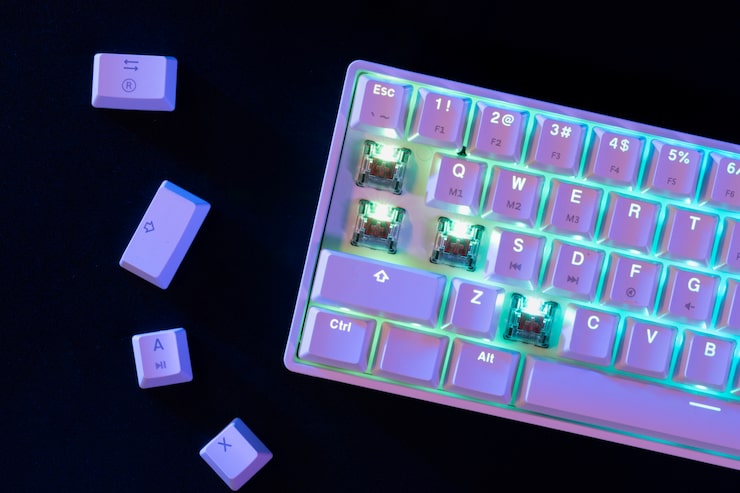
Mechanical keyboards have transformed from being niche devices for enthusiasts into mainstream tools for productivity, gaming, and creative work. Unlike membrane keyboards, they rely on individual mechanical switches under each key, delivering a tactile and durable typing experience.
Whether you’re a gamer chasing fast response times, a writer who values comfortable keystrokes, or a professional who spends hours at the desk, a mechanical keyboard can significantly enhance your daily tasks. However, with countless options on the market—varying in switch types, layouts, features, and price ranges—it can be overwhelming to decide which one fits your needs.
This guide will help you navigate the world of mechanical keyboards, breaking down the key considerations, the types available, their pros and cons, and insights to help you make the best choice.
Devices | Features | Price |
|---|---|---|
Mechanical Keyboard | Gaming |
What to Consider Before Buying a Mechanical Keyboard
1. Switch Types
The heart of any mechanical keyboard is its switch mechanism. Each switch type offers a different typing feel and sound profile.
- Linear switches: Smooth keystrokes, no tactile bump. Great for gaming.
- Tactile switches: A noticeable bump in the middle of the press. Ideal for typing accuracy.
- Clicky switches: Provide both a bump and an audible click. Satisfying for typists but noisy in shared spaces.
2. Keyboard Size & Layout
- Full-size: Includes number pad, function row, and all keys. Best for productivity.
- Tenkeyless (TKL): Compact, no number pad. Great balance between size and function.
- 75%, 65%, 60% layouts: Smaller sizes for minimalists and travelers, sacrificing some keys for portability.
3. Build Quality
- Plastic cases: Lightweight and affordable but less durable.
- Aluminum/metal frames: Sturdy, premium feel, longer-lasting.
- PBT vs. ABS keycaps: PBT is more durable and resistant to shine, while ABS is smoother but may wear faster.
4. Features & Customization
- Backlighting: From simple white LEDs to customizable RGB effects.
- Programmable keys: Helpful for gaming macros or productivity shortcuts.
- Hot-swappable switches: Allow you to change switch types without soldering.
- Connectivity: Wired offers stable performance, while wireless options add convenience.
5. Noise Level
If you work in shared spaces, choose quieter switches (linear or dampened tactile). For private setups, clicky switches can be satisfying and fun.
6. Budget
- Entry-level: Affordable, basic features, suitable for first-time users.
- Mid-range: Higher build quality, customizable features.
- Premium: Exceptional durability, hot-swap capability, advanced lighting, and ergonomic designs.
Product Summary: Types of Mechanical Keyboards
| Type | Best For | Pros | Cons |
|---|---|---|---|
| Gaming Keyboards | Gamers, esports enthusiasts | Fast response, RGB, programmable keys | Can be expensive |
| Productivity Keyboards | Office, writers, programmers | Comfortable, reliable, durable | Fewer flashy features |
| Compact Keyboards | Minimalists, travelers | Portable, saves desk space | Missing keys like numpad or F-keys |
| Ergonomic Keyboards | Long typing sessions, professionals | Reduces strain, wrist support | Learning curve, higher cost |
| Custom/DIY Boards | Enthusiasts, hobbyists | Fully customizable, unique layouts | Requires time, effort, and budget |
Pros & Cons of Mechanical Keyboards
Pros
- Durability: Switches can last tens of millions of keystrokes.
- Typing comfort: Consistent feel and responsiveness.
- Customization: Wide variety of switches, layouts, and keycaps.
- Aesthetic appeal: From minimalist designs to RGB light shows.
- Performance: Lower latency and better feedback for gaming.
Cons
- Price: Generally more expensive than membrane keyboards.
- Noise: Clicky switches may disturb others.
- Weight: Sturdy builds can be heavy and less portable.
- Learning curve: Compact layouts may take time to get used to.
Who It’s Best For
- Gamers: Benefit from fast actuation, customizable macros, and RGB lighting.
- Writers & Typists: Tactile or clicky switches improve typing accuracy and comfort.
- Programmers & Office Workers: Tenkeyless or ergonomic layouts enhance efficiency.
- Travelers/Minimalists: Compact 60% or 65% boards are lightweight and portable.
- Enthusiasts: Customizable keyboards offer endless personalization options.
FAQs About Mechanical Keyboards
Q1: Are mechanical keyboards better than membrane keyboards?
Yes, in terms of durability, typing feel, and performance. However, they cost more and can be noisier.
Q2: Which switch type should I choose?
- Linear for gaming.
- Tactile for balanced typing and gaming.
- Clicky for satisfying typing (if noise isn’t an issue).
Q3: Do mechanical keyboards last longer?
Yes, most switches are rated for 50–100 million keystrokes, far exceeding membrane alternatives.
Q4: Are wireless mechanical keyboards reliable?
Modern models with Bluetooth or 2.4GHz connections are stable enough for daily use, though wired is still preferred for competitive gaming.
Q5: Can I customize my keyboard later?
Yes, many mechanical keyboards allow keycap swaps, switch changes, and software-based remapping.
Real Insights & Expert Opinions
Having switched from a standard office keyboard to a tenkeyless mechanical keyboard, the difference in typing comfort was immediately noticeable. The tactile feedback reduced typing errors, while the compact design freed up desk space for mouse movement.
Experts in ergonomics highlight that mechanical keyboards encourage healthier typing postures when paired with wrist rests and adjustable desk setups. Gamers also confirm that faster response times and reliable key rollover provide a competitive edge.
Final Recommendation
When choosing a mechanical keyboard, focus on your primary use case and personal preferences.
- If you’re a gamer, go for a responsive keyboard with customizable lighting and macro keys.
- If you’re a writer or office worker, look for tactile switches and a comfortable, durable layout.
- If you value portability, compact keyboards are the way to go.
- If customization excites you, consider hot-swappable or DIY kits.
A mechanical keyboard is not just a tool—it’s an investment in productivity, performance, and typing comfort. By evaluating your needs and budget, you can find the perfect board that makes every keystroke satisfying and efficient.